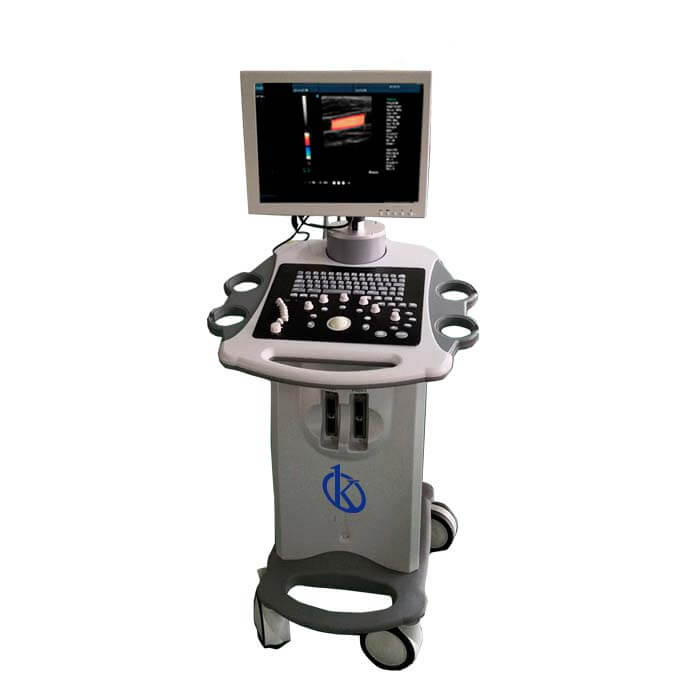
Common Errors and Troubleshooting Symptoms for the YR05153 Portable Ultrasound Scanner
The YR05153 Portable Ultrasound Scanner is a sophisticated device designed for various medical applications, including abdominal, cardiac, gynecological, urological, and vascular imaging. While this machine excels in providing high-quality imaging and functionality, users may encounter certain errors or symptoms that could hinder its performance. This article will discuss common errors and troubleshooting by symptoms, focusing specifically on the YR05153 model.
Understanding the YR05153 Portable Ultrasound Scanner
The YR05153 is equipped with a 15-inch color LED display, advanced Doppler imaging capabilities, and multiple imaging modes. Its design incorporates a Windows-based operating system for seamless connectivity and printing options. However, like any advanced equipment, it may exhibit problems that require troubleshooting.
Technical Data Table of YR05153
| Model | YR05153 |
|---|---|
| Category | Ultrasound Scanner |
| Subcategory | Ultrasonic Color Doppler Diagnostic System |
| Weight | 165 kg |
| Dimensions | 96 cm × 75 cm × 135 cm |
| Ports | 2 Transducer Ports, 2 USB Ports |
| Hard Drive | 128GB SSD |
| Image Output Options | Image, report, or image + report |
| Connection | 2 Ethernet Ports (100Mb/1000Mb) |
| External Monitor Output | VGA, HDMI |
Troubleshooting Symptoms
When operating the YR05153, users may face various issues. Below are common symptoms, their possible causes, and solutions.
Equipment Does Not Power On
This issue can arise due to several factors, including power supply problems or internal faults.
- Possible Causes:
- Disconnected power cable
- Faulty power supply unit
- Blown fuse in the power socket
Solutions:
- Check and reconnect the power cable.
- Inspect the power supply unit for defects.
- Replace the blown fuse.
Error Code E-03
Error code E-03 indicates a malfunction within the machine's internal software or hardware.
- Possible Causes:
- Software corruption
- Faulty hardware connection
Solutions:
- Restart the device to reset the software.
- Examine hardware connections and reseat cables as necessary.
Inconsistent Readings
Inconsistent readings can significantly affect diagnosis and treatment accuracy.
- Possible Causes:
- Improper transducer placement
- Low gel application
- Calibration issues
Solutions:
- Ensure the transducer is correctly placed on the skin surface.
- Apply a sufficient amount of ultrasound gel to enhance conductivity.
- Recalibrate the system following the manufacturer's instructions.
Symptom Diagnosis Matrix
| Symptom | Possible Cause | Recommended Solution |
|---|---|---|
| Equipment Does Not Power On | Disconnected power cable | Reconnect power cable |
| Equipment Does Not Power On | Faulty power supply | Inspect or replace power supply |
| Error Code E-03 | Software corruption | Restart the device |
| Error Code E-03 | Faulty hardware | Check hardware connections |
| Inconsistent Readings | Improper probe placement | Correct probe positioning |
| Inconsistent Readings | Low gel application | Apply more gel |
Frequently Asked Questions
What should I do if my YR05153 displays error code E-03?
Error code E-03 typically indicates a malfunction. Restart the device to reset the software and check hardware connections to ensure they are secure.
How can I extend the lifespan of my YR05153 Portable Ultrasound Scanner?
To extend the lifespan, regularly perform maintenance checks, ensure proper handling, and follow recommended calibration procedures.
What imaging modes does the YR05153 support?
The YR05153 supports multiple imaging modes, including B, M, C, and Doppler imaging modes. Each mode serves different diagnostic purposes.
How can I ensure accurate readings from my YR05153?
To ensure accurate readings, use enough ultrasound gel, properly position the transducer, and regularly calibrate the device according to the manufacturer's guidelines.
What are the connectivity options for the YR05153?
The YR05153 includes multiple connectivity options, such as USB and Ethernet ports, allowing for easy data transfer and printing.
Is there a warranty for the YR05153 Portable Ultrasound Scanner?
Yes, the YR05153 typically comes with a warranty covering manufacturing defects. It's important to review the warranty terms provided upon purchase.
If you are looking for a fusion of innovation and quality, you have come to the right place. At Kalstein, we offer you the luxury of exploring our exclusive catalog of laboratory equipment. We manufacture every device to the highest standards of excellence. Our intuitive and seamless online purchasing channels are designed for your convenience, securing the most competitive prices. Hesitate no longer — we bring science to life, it is time to become part of our community.