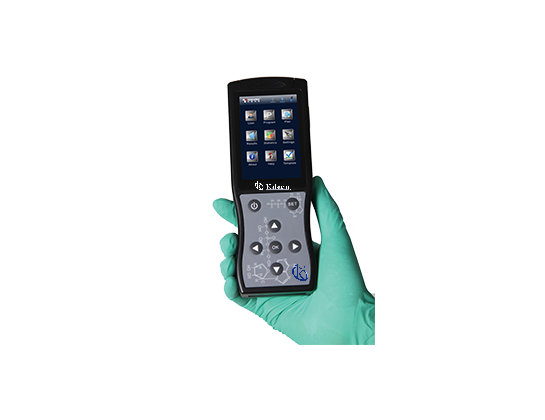
Common Errors and Troubleshooting by Symptoms for the YR06071 ATP Hygiene Monitoring System
The YR06071 ATP Hygiene Monitoring System is a cutting-edge device designed for efficient and precise hygiene monitoring across various environments. While it is engineered for reliability, users may encounter errors or issues that could hinder its performance. This guide will detail common symptoms, probable causes, and effective troubleshooting steps to ensure the YR06071 operates optimally.
Understanding the YR06071 ATP Hygiene Monitoring System
The YR06071 is an advanced portable testing system that measures adenosine triphosphate (ATP) levels to assess hygiene. Its rapid detection time of just 10 seconds per test allows for immediate results, aiding in maintaining high hygiene standards in industries such as food service, healthcare, and manufacturing. The system's ability to store up to 10,000 results and connect via USB or Bluetooth enhances its usability.
Technical Specifications of YR06071
| Specification | Detail |
|---|---|
| Model | YR06071 |
| Dimensions | 189mm x 70mm x 35mm |
| Weight | 280g |
| Detection Limit | 10-16 moles ATP |
| Detection Deviation | ±5% or ±5 RULs |
| Self-calibration on Start | 15s or 60s |
| Real-time Detection Time | 10s/test |
| Memory Capacity | 256 test plans, 256 user IDs, 2000 test programs, 10000 results |
| Communication Interface | USB, Bluetooth |
| Test Repeatability | 8%-20% |
| Correlation Coefficient | R2≥0.995 |
| Power Source | Rechargeable Battery |
| Duration | Continuous operation for 8 hours, standby for 600 hours |
| Operating Temperature | 5-40℃ |
| Operating Humidity Range | 20-80% |
Troubleshooting Common Symptoms
Equipment Does Not Power On
If the YR06071 fails to power on, the following could be the causes:
- Battery Depletion: Ensure the device is adequately charged.
- Faulty Power Button: Check if the power button is responsive.
- Internal Malfunction: If the device still does not power on after confirming the previous steps, it may require professional service.
Error Code E-03
An E-03 error code indicates a potential calibration issue. Follow these steps:
- Recalibrate Device: Conduct a self-calibration following the user manual.
- Check for Contaminants: Ensure no foreign substances are affecting the test environment.
- Restart the Device: Power down and restart to reset the system.
Inconsistent Readings
Inconsistent readings can stem from various factors. Here’s how to address them:
- Sample Preparation: Verify that samples are collected and prepared correctly.
- Environmental Factors: Ensure the testing area meets the required temperature and humidity levels.
- Device Calibration: Regularly calibrate the device to maintain accuracy.
Symptom-Cause-Solution Table
| Symptom | Probable Cause | Solution |
|---|---|---|
| Equipment Does Not Power On | Battery depletion | Charge the battery |
| Error Code E-03 | Calibration issue | Perform self-calibration |
| Inconsistent Readings | Sample preparation errors | Check sample collection methods |
| Bluetooth Connection Failure | Device not discoverable | Ensure Bluetooth is activated |
| Slow Response Time | Device overheating | Allow the device to cool down |
Best Practices for Maintaining YR06071
To minimize issues with the YR06071, follow these maintenance practices:
- Regular Calibration: Calibrate the device before use to ensure accuracy.
- Proper Storage: Store the device in a cool, dry place when not in use.
- Daily Checks: Perform daily checks of battery levels and functionality.
Frequently Asked Questions
What types of tests can the YR06071 perform?
The YR06071 can conduct tests to measure ATP levels on surfaces, enabling rapid assessment of hygiene levels and identification of potential biological contaminants.
Is it easy to use?
Yes, the YR06071 is designed to be user-friendly. Its display shows results in seconds, and it offers Bluetooth and USB connectivity options for enhanced usability in professional settings.
How long does the device battery last?
The YR06071 features a rechargeable battery that can provide up to 8 hours of continuous operation or 600 hours in standby mode, making it suitable for long workdays.
What should I do if I get an error code?
Refer to the troubleshooting section of the manual for specific error codes. Common steps include recalibrating the device, checking for sample contamination, or contacting technical support if the problem persists.
Can I connect the YR06071 to a mobile app?
Yes, the YR06071 can connect via Bluetooth to compatible mobile applications for improved data management and reporting.
Where can I request a quote for the YR06071?
You can request a quote directly through our dedicated service channels to receive a personalized offer and exclusive benefits.
Conclusion
By understanding common symptoms and troubleshooting techniques, users can maintain the reliability of the YR06071 ATP Hygiene Monitoring System. Consistent monitoring and adherence to best practices will lead to optimal performance, ensuring hygiene standards are met across various environments.
If you are looking for a fusion of innovation and quality, you have come to the right place. At Kalstein, we offer you the luxury of exploring our exclusive catalog of laboratory equipment. We manufacture every device to the highest standards of excellence. Our intuitive and seamless online purchasing channels are designed for your convenience, securing the most competitive prices. Hesitate no longer — we bring science to life, it is time to become part of our community.