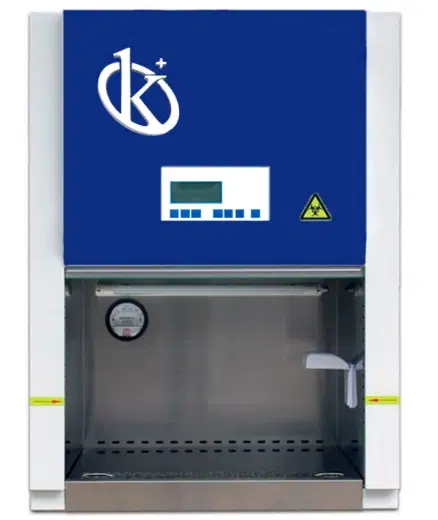
Common Errors and Troubleshooting Symptoms for the YR0090-A Biosafety Cabinet
The YR0090-A Biosafety Cabinet is a critical component in laboratories that handle biological materials. While it is designed for safety and efficiency, operators may encounter various errors and symptoms that require troubleshooting. Understanding these issues and their solutions is essential for maintaining optimal performance and ensuring safety in laboratory environments.
Understanding Common Errors in the YR0090-A
Errors in the YR0090-A can arise due to various factors, including user errors, maintenance issues, and environmental conditions. This section will explore the most common errors associated with this model.
Technical Specifications of the YR0090-A
| Specification | Details |
|---|---|
| Model | YR0090-A |
| Cleaning Grade | Class 100@≥0.5μm (U.S. Federal 209E) |
| Number of Colonies | ≤0.5pcs/plate-hour (Φ90mm culture plate) |
| Average Wind Speed | Inside Door: 0.38±0.025m/s |
| Noise Level | ≤65dB(A) |
| Power Supply | AC 220V/50Hz |
| Maximum Consumption | 600W |
| Weight | 140KG |
| Internal Dimensions (mm) | 600×500×520 |
| External Dimensions (mm) | 760×650×1230 |
Troubleshooting by Symptoms
When operating the YR0090-A, users may encounter specific symptoms that indicate underlying issues. This section categorizes the symptoms, their probable causes, and suggested solutions.
Equipment Does Not Power On
One of the most common issues operators may face is the equipment not powering on. This can be caused by:
- Power supply issues
- Tripped circuit breaker
- Faulty internal wiring
To troubleshoot:
- Check the power cable connections.
- Inspect the circuit breaker and reset if necessary.
- Consult a technician for internal wiring inspection.
Error Code E-03
Error code E-03 typically indicates a filter issue. Possible causes include:
- Clogged HEPA filter
- Incorrect filter installation
Fixes include:
- Replace or clean the HEPA filter.
- Ensure proper installation of the filter.
Inconsistent Readings from the Airflow Sensor
If the airflow sensor shows inconsistent readings, check for:
- Obstructions in airflow
- Calibrated settings
Solutions involve:
- Clearing any obstructions from the airflow.
- Re-calibrating the sensor according to the manufacturer's guidelines.
Symptom-Cause-Solution Table
| Symptom | Possible Cause | Solution |
|---|---|---|
| Equipment does not power on | Power supply issues, tripped breaker | Check power connections, reset breaker |
| Error code E-03 | Clogged filter | Replace or clean HEPA filter |
| Inconsistent readings | Obstructions, calibration errors | Clear obstructions, recalibrate sensor |
Frequently Asked Questions
What are common symptoms indicating maintenance is required for the YR0090-A?
Common symptoms include fluctuating airflow readings, unusual noises, and error codes appearing on the display. These may indicate a need for filter replacement, calibration, or mechanical inspection.
How can I ensure optimal performance of the YR0090-A?
To maintain optimal performance, ensure regular maintenance checks, replace filters as needed, and calibrate sensors regularly. Additionally, keep the cabinet free from obstructions and ensure it is clean.
What should I do if the YR0090-A shows an error code that is not listed in the manual?
If an unlisted error code appears, refer to the manufacturer's support for guidance. Document any unusual symptoms and previous troubleshooting steps taken, as they may assist the technician in diagnosing the issue.
How often should I replace the HEPA filter in the YR0090-A?
The HEPA filter should typically be replaced every 6 to 12 months, depending on usage and environmental conditions. Regular monitoring for clogging is essential.
Can I perform maintenance on the YR0090-A myself?
While some basic maintenance tasks, such as filter cleaning or replacement, can be performed by users, it is advisable to consult a qualified technician for any complex issues or internal inspections to ensure safety and compliance.
What safety features are integrated into the YR0090-A?
The YR0090-A includes features such as UV lamp protection, air circulation monitoring, and a negative pressure design to prevent biological contamination, ensuring a safe working environment.
If you are looking for a fusion of innovation and quality, you have come to the right place. At Kalstein, we offer you the luxury of exploring our exclusive catalog of laboratory equipment. We manufacture every device to the highest standards of excellence. Our intuitive and seamless online purchasing channels are designed for your convenience, securing the most competitive prices. Hesitate no longer — we bring science to life, it is time to become part of our community.